Showing posts with label Tech. Show all posts

How I Edit Videos in iMovie

Several months ago I was encouraged by Divya of Jewels of Sayuri to share how I make and edit my videos. I probably should start with how I make them, but that's a little harder to film. Iinstead I'm first sharing my process of editing videos in iMovie. 

Let me start by saying that I use iMovie because it came already installed on my MacBook. When I used a PC, I also used the basic editing program there too. 

To easily show you my editing process, I (of course) created a video on how to do Video Editing in iMovie. Before you watch the video, I should point out that to access the editing screen on which I start in the video, you’ll need to open iMovie. From the “Projects” screen (pictured below), click on the large “Create New” square (with the plus sign) and a small window will pop up. Click “Movie” and the editing screen like I used should open. 

From there, you can begin editing your video. Here's the video on how I do it.

I hope this eases your ability to edit your own videos. However, if you have any other questions, please don't hesitate to ask. I'll do my best to answer them. In the meantime, I encourage you to play in and explore your editing program!
Changes to My Blogger Blog and Tips for You (custom url and favicon)

I just have to shout a WOOHOO. If you would, please take a look up at your address bar above. Go on, I'll wait. . .

Do you see it? It no longer says CraftyHope.BLOGSPOT.com. My blog is now simply CraftyHope.com!!

We've owned the url for a while now and just used it on my Tumblr because they had free hosting. Well, while I was at the blogger's conference on Tuesday, Debbie of Flower Child Designs mentioned that she has a Blogger blog and only pays a minimal amount to have her own URL on it. With further research, I realized that I too could have Blogger direct my blog to the url that I already own. WHAT!? I was able to do this by going to the basic settings page for my blog and adjusting the publishing option.
See the 'edit' button circled above? I clicked it and found complete instructions for changing my blog address. It did involve going into the site where we pay for the URL and filling in some info, but Google (Blogger) provided that info. I will admit that Pat helped me with it as I already had a headache, and he's much better with tech speak than I am. However, it was an extremely easier process than I had anticipated.

Now, let me apologize for the hokey welcome sign above, but I wanted to work in the little flowers as those are now my favicon. What's a favicon you ask? According to Google, it's "an icon associated with a URL that is variously displayed, as in a browser's address bar or next to the site name in a bookmark list."

To me, they are just the cute little pictures next to the site names in my browser. To illustrate:
I circled all the favicons in my open browser. At the far right is mine. It's hard to see because favicons are only 16 pixels by 16 pixels, but here's what it looks like enlarged.

Yup, it's a cute daisy I created in Photoshop and added to the favicon option in Blogger. You'll find that option at the top of the layout page of blogger.
Basically, you just upload a small image there and it becomes your favicon. Since you have such an EXTREMELY SMALL area, you'll want to use a pretty basic image.

And that's that.

I've got some other changes I want to make on the blog, but Blogger's not cooperating right now. I think I might have given it whiplash or something. Oh well, tomorrow's another day and predicted to be a rainy one at that. I might get even more accomplished. Here's hoping.

Blogpocalypse: The End is near (of Google Reader, that is)

With GoogleReader going kaput as of TOMORROW, I know many people are scrambling for new ways to collect and read their favorite blogs. I decided several months ago to try out and use TheOldReader simply because it felt somewhat familiar. However, I'm seeing a lot of creatives mentioning  Bloglovin  as a popular choice so far. If you are leaning in the Bloglovin direction, please don't forget to follow my blog with Bloglovin too.

Goodbye, old friend

However, if you are still undecided here are a few posts that give you more info on some of the alternatives.
Of course, doing a search will yield tons of results. However, do it FAST as time's a tickin'!!

New Buttons (For the Blog)

If you're like me and read most of your blogs in a feed-reader, you don't often actually SEE the changes made on actual blogs unless the blogger mentions it. Well, I've recently made a few changes to mine that I've been wanting to make for ages so I thought I'd mention it as well as how I did it. (Oh, and it's mostly button additions, you know how I like buttons! ;)  )

The first change I made was to clean up the social media buttons on my right sidebar. If you remember, they looked something like this.
Ewwwww!

And I was able to re-vamp that into this.
Ahhhhh!


Fabulous right!? I'm guessing some of you might want to know just HOW I was able to do it. Well, with the help of the following.
  1. This post from My Favorite Things on how to add social media buttons. There are actually many, many posts out there similar to this one, but her instructions seemed the most clear and easy-to-follow. 
  2. The links at the bottom of this Moms Make Money post. The post itself has a video with instructions on adding the links if you want, but I just needed some free social button images. (The last link with the cute color icons was the one I used.) 
  3. Photobucket. Basically, that's where you save your social button images so that you have an online link in order to put them into the code.
That's all I REALLY needed to get the changes made, but let me admit the last resource I used

4. (optional) My own limited knowledge of how to work with HTML from my time working at a website design company (though I just wrote the copy for the websites, I DID NOT write the code.) As well, my husband is a software programmer/coder extraordinaire and was able to help me get the buttons cooperate just the way I wanted them to.

Now, that's not all the changes I made.
  • I also added a widget so that you can follow the CraftyHope blog by e-mail. I know that is becoming a popular option lately. Check out the widget just above my new flashy social media buttons on the right. This was super easy to add in Blogger. 
    • From your Blogger drop-down menu select Layout
    • In Layout mode, you'll see several buttons in the middle of the screen that say "Add a Gadget", click that.
    • A new window will pop open. Scroll down the list in that window until you see "Follow by Email" and click into that.
    • From there, it's as easy as clicking save and making sure the Gadget is placed where you want it on your blog layout. DONE!
  • A reply button was also added to my comments section. I've actually been trying to figure out a way to add this little button for MONTHS and finally found this post from Spice up Your Blog that made it way simple to do.
Anyway, that's all the changes so far. I know there are a few others I want to make, but I'm so happy right now just to have gotten rid of some of the clutter that was plaguing my sidebar.

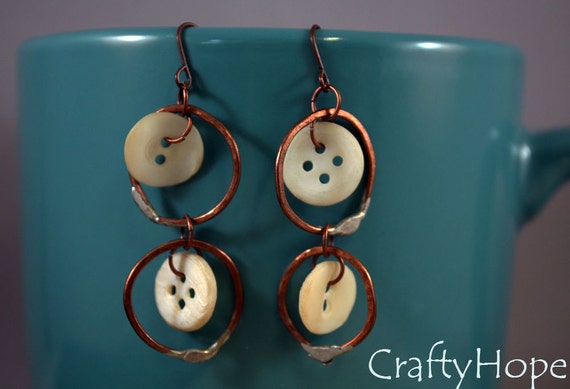
For a final dose of pretty, I listed these earrings today!
Unique Delight Earrings
I hope I was able to help you add some pizazz. . .or just some more buttons. . .to your blog also.


So Full of FAIL

I want to go ahead and say that I’ve been blogging for a while now, and I consider myself a fairly skilled person when it comes to technology. That kind of arrogance always leads to problems. Case in point: yesterday, I discovered what a huge LOSER I can be sometimes.

See, for a good long while I’ve been wanting to be able to reply to comments via e-mail (rather than clogging up my comments page with responses from moi.) I kept searching the settings in blogger to try to figure out how to do this. (Seriously, I went through all the setting SEVERAL times over the past eight months or so.) Yesterday afternoon I finally broke down and asked another blogger. Within minutes of hitting the send button on that request for help, I figured it out by myself. GAHHHHH!!! All I have to do is just reply to the e-mail alerts that Blogger sends me. You have NO IDEA how big of a fool I feel for simply not getting this. I think I was under the assumption that the e-mail I received about the comments was just an alert and one of those “do not reply to this” e-mails. . . how very wrong I was.

So, unless anyone has an issue with this, I’m no longer going to reply to comments in the comments section. I’ll actually send out a personal e-mail to each of you who leave a comment. The only time I plan on writing a comment to myself is to clear up anything, to answer a question, when there is no e-mail for the commenter, or when some other issue arises. I actually already started with the e-mails yesterday (when I realized how easy it was.) Does anyone foresee any problems with this?? Please let me know!

I just had to fess up as to how big of a goober I can be and why you may see changes in the comments section.**

~o~o~o~o~o~o~o~o~o~o~o~o~o~o~o~o~o~o~o~o~o~
Now for some eye candy-
Magic Stirs Bracelet  

~o~o~o~o~o~o~o~o~o~o~o~o~o~o~o~o~o~o~o~o~o~
Before I forget. . .. a GIVEAWAY!
Beading Arts has a review of and is giving away a copy of Margot Potter's new book. Head over there to read the review and enter for a chance to win!

**{Hopefully my failure helps someone else who wants to do the same thing. Yes, I am risking my own embarrassment to help. Of course, I do realize that everyone else probably already knew how to reply to comments via e-mail and I may be just making myself look like a bigger idiot than I feel. Ah well. It is what it is.}

Simple Notes (& TT)

I kinda let loose yesterday, huh? Sorry about that.
How about today I just do a simple list of what's going on:
-I'm getting to work from home today. That means that I'll take some short (5 min) breaks every 45 minutes or so to get the laundry, dishes, and house picked up.
-I put a roast in the crockpot earlier and now that's all I can think about. It better be good.
-My cat (Asia) is driving us crazy. She walks around the house just meowing over and OVER and over and OVER.
-The dang laptop keeps losing internet connection and makes it hard for me to get any work accomplished. Grrrrrr.
-It's really nice to have Twitter on days like today. That way, I can still feel connected to other people, without having to actually interact with them. (Yes, I know I'm a tad antisocial.)
-I use three feed readers to manage the blogs I read: one for work, one personal that I read daily, and one for blogs I just want to remember to check in on from time to time. Is this obsessive? I do want to mention that my daily personal one includes 222 blogs, divided into 14 different categories.
-I may have an internet addiction.

It's 'Techie Tuesday," when I share some of the geeky-interest items from the internet and elsewhere:
  • Here's a font-like movie-geek quiz. See if you can recognize the movie from just a single letter of the font from the movie poster. I didn't do great, but I did get a few of them. Now, you try.
  • And for some more fun, try this little game - Switch. There is a tutorial. Beware, it can be addictive.
  • I really enjoy those "I Love the World" commercials from the Discovery Channel. Here's one a group did on their own:
  • This online tool will help you oldify your pictures. It's all in chinese or japanese, but it's pretty self-explanatory. I did it with a picture from my nieces' birthday party in April.

Let me know if Tuesday's topics don't interest you at all. I've been thinking of doing something else on Tuesdays. Lemmie know!!

This One's All Over the Place

Can you believe it? I've been blogging here for a year. Yesterday was my one year BLOGIVERSARY. I intended to mark it with a special blog post, but couldn't come up with anything special enough in the little bit of time I had. So - like my birthday - there will not be much of a celebration. In fact, let's just move on.
I had a nice birthday dinner with my family on Friday and received some beautiful flowers from my mom, step-dad, and nieces.
I was also able to craft almost all weekend, with breaks for eating and a dance/football game thing on Saturday night. (ROLL TIDE by the way!)
It is Techie Tuesday and I don't really want to get into all of that - instead just go check out this search by color flickr tool. For a color-freak like me, it's addictive.

However, do let me share with you some more of the neat Halloween links I've found.
  • Here are some more Halloween recipes. These are from Better Homes and Gardens.
  • How about a downloadable Halloween card? It's soooo cute, I mean scary, I mean it's "pretty creepy" hehehe.
  • For some Scary movie suggestions you can check out this list of the 20 scariest movies of all time OR this list of the top 25 Halloween movies. Really, these two lists are quite similar with only a few differences. And, being a scary movie fan - I'd have to agree with MOST of the suggestions listed.
I just love Halloween - there's so much cool stuff out there on the internet.

OH! I've also been working on some new Halloween jewelry. You might remember the earrings and bracelets I made last year. This year's project will not be a shrink plastic one. However, it's also not done yet, so here's a sneak peek:
If things work out, I'll post the whole project on the Fairy Creative site before the big holiday. I'll let you guys know if that happens.

A Minor Glitch In the Works

Hey all, Just a quick post from work to let you know that my laptop is having some problems and I won't be posting until I get it back. This will likely be tomorrow as the techs at work are 'on it'. Apparently, my laptop was "Hijacked." Supposedly, that just means some spyware got on it or something. Whatever! As long as they can fix it, it'll all be good.
So much for "Techie Tuesday." I feel a little stranded without my laptop. Withdrawal symptoms will last until I can get it back.

Until then. . .

Getting Started on the Rest of the House and TT (including some iPhone tips)

MAN!! I feel like I keep missing Mondays or something (wishful thinking maybe). I just have so much to do after a weekend that I can't seem to focus on a blog post.

I said I was going to start working on the rest of the house, and I DID get some tasks accomplished yesterday. Yay me! I decided to start in the kitchen and was able to clear off a few counters, organize under the sink, and clean out the myriad of Styrofoam boxes from the fridge. Instead of rewarding myself with crafting - I looked through some magazines and watched the Olympics WHILE finding a condo in Gulf Shores for Labor Day weekend. I did cheat and reward myself during lunch by going to a thrift store. I'll share that loot with you later.

It is "Techie Tuesday" So here's some of the geek interest I've found"Now for those iPhone addicts (like me)
  • Here are some new free apps for the iPhone.
  • As well, try these iPhone tricks. I'm so happy to have found this one. It includes how to do some things I was wondering how to do. . . like take screen shots.
I'm not so much the chatterbox today. I'm gonna help with my nieces tonight and today was their first day of school, soooooo I may have more to say tomorrow.

Remember to TAKE MY POLL (in the sidebar.)

Craft Room Update (and TT)

I'll go ahead and admit it, I flaked on organizing the craft room last night. I spent so much time trying to get the two blog posts up and cooking dinner that when I finished watching a movie with LOML*, I was ready for bed. Hopefully, I have redeemed myself by doing 15 minutes this morning. I might get a chance to do another 15 minutes later today, but we'll see since I have my cousin's funeral this evening and a headache that just won't quit.

It's another "Techie Tuesday," which has just turned out to be the day I try to post the geeky links and tools that interest me. Hopefully, you're semi-interested.
  • Here's a list of some color tools. I haven't really gotten to play with any of these yet.
  • If you are a fan of sudoku puzzles like I am, this site will keep you engaged for a little while.
  • I know I'm ready for the next Harry Potter movie (Book 6- The Half Blood Prince). Here are some photos from the upcoming movie. Beware, though, it just makes you more anxious for it to be released.
I'm going to tend to my aching head and try to get some work done. I should be back tomorrow with something wild!

Mattress Prep

Yawn! Getting ready for a new mattress is a bit more work than you would think.
We bagged up another lawn and yard bag of clothes (all his!), gathered a box of items to donate (plus the old mattress and box springs), and threw away several large boxes of trash. Then, I vacuumed the floor and cleaned some stains on the carpet before LOML* put together the universal bed frame. After that, we decided to trim the cat's nails before blowing up the air mattress and heading to, um, floor. Neither of us slept too well on the air mattress. Apparently, the kitty wanted revenge and was CRAZY - which kept up LOML*. However, the air mattress was not the most comfortable surface for me. Now, I'm sore and have a headache that just won't quit. We CAN'T WAIT to go to bed tonight!!

"Techie Tuesday" is making an appearance today.
It's not much, but here you go:
  • Make a mandala online. I did!
  • Check out flickr vision where you can see what picture other people around the world are uploading to Flickr, in real time. Pretty cool.
Have a great day. Oh, and good news, if you ever come to stay with us, the air mattress is ALL YOURS!! It is more comfortable than the sofa bed, really!!

*LOML=Love of My Life

Let's Call it "Stuff" To Do (and Techie Tuesday)

Can you guess what resulted in this? Bet you can't.
An awesome party? - Nope
Me and the hubby playing beer pong in our underwear? - NOPE!

This is the result of LOML* and I getting started on our to do list. We are affectionately calling it our "$HIT TO DO" list. How sweet!
And, no - drinking a bunch of beer was not on the list. Disposing of a bunch of beer, however, was.

Let me start by saying that after dinner we made up our VERY LONG LIST. It encompasses every room in the house, the sun porch, the garage, outside the house, one vehicle, and the RV. Some of the tasks are as specific as washing the futon cover on the sun porch and charging the Jeep's battery to as vague as cleaning out the garage and getting a new bedroom suite. In all, there are 93 tasks to be completed. We plan on adding more as we think of them. Yay! LOML* would like to complete one item on the list each DAY. (We'll see how that goes.) As we 'finished' making the list last night, he asked, "What can we get done tonight?" The first quick-and-easy item I found on the list was "empty beer on the sun porch."
An easy explanation for why we have a bunch of beer on our sun porch? After going to parties or the beach, we tend to just put the old beer out there (to dispose of at a later time.) This is what our beer pile looked like just after we started These are all the empty containers. Success! Yay!
Let me clarify that we do not usually consume Bud Light and neither one of us can recall why we have almost a case of it on porch. I do not think that I was involved in that purchase.
We are happy that we've started on this list. That in itself feels like a weight off our shoulders.

Anways- It's "Techie Tuesday" and after getting SO MUCH done yesterday, I'm gonna make it easy on myself and just share a few links:Now, go get something done on your to-do list!!

*LOML=Love of My Life

Techie Tuesday - Twitter

Okay, it's been a while since I've done a "Techie Tuesday" post
I figured this topic deserved one.
I've been obsessed with Twitter lately and figured I would talk about that today. If you haven't heard of Twitter, it's a cool little cross between chat rooms and instant messaging. You have 140 characters to say what you are doing. This bit of text goes out just to the people who are 'following' you. As well, you can follow whomever you like (as long as they are on Twitter). If you look to my sidebar on the right, you can even see my recent twitter updates.
There's just so much to say about Twitter. . .I'll try to condense it as best I can.

There has been much ta do and ta da about Twitter in the technology world. But in the real world and where I live, it's still quite an anomaly. LOML* (the big geek he is) doesn't use it, but I've found that many in the Search and Online Marketing industry are using it/calling it a valuable tool. I dunno, for me it is totally more social and feeds my nosy, need-to-know-what-other-people-are-doing self.

I personally have two different twitter accounts, one related to the field in which I currently work - to try to keep up on current news and items of interest and another that is my personal one. On the personal one: I follow friends, other crafters, and people who are near my location. I've found that I also follow some people because the people I follow have replied to them, and I want to see what that's about. I did say I'm nosy, didn't I?

There are tons and tons of blog posts listing tools related to twitter. These lists do include some desktop tools you can use so you don't have to have be ON the Twitter page to use it. I personally use Twhirl on my desktop. I chose it because you can have several accounts open at the same time. The people I follow use a variety of OTHER twitter clients including Twitter Mail, Twitterfeed, TwitBin, and Twitterific. As well, the majority of people I personally follow just use the web or text messaging.

One tool I've found that I really like is TwitterLocal. This lets you enter an area and a distance to search and will locate other people in that area who are twittering. It's cool, especially if you're interested in locating others near you.

Anyway, check Twitter out. What do you have to lose? Speaking of it, go ahead and follow me on Twitter. I'll see you there!


*LOML=Love of My Life

Techie Tuesday - I'm Such a Geek

Wow! I've been so much sucking at blog posts lately!!
I've got a few things I want to share for "Techie Tuesday"Basically, they just show you how much of a geek I can be. Just in case you still have doubts, even after Friday's post with the 'Yay!' thing.
  • Several of these 10 cult classic mid 80's fantasy movies are on my shortlist of favorite movies. Seriously, 'cult classic' 'mid 80's' 'fantasy movies' - AWESOME!
  • I mentioned Battlestar Gallactica's season premiere last week, but failed to offer up this Battlestar top ten list from the David Letterman Show. If that doesn't peak your interest, I don't know what will.
  • I absolutely LOVE the craftster community, especially when members share their geek love also. Since I can't knit or really crochet, these Fellowship of the Ring amigurumi are simply mystical to me. I love when craftiness and geekiness come together.
Alright, the next two do not illustrate the geek me, but I do want to share them. So there!
I needs to dash and actually finish some stuffs. Oh happy day.

Techie Tuesday

It's time for more geeky goodness with another edition of "Techie Tuesday."
  • First, an article that is a few weeks to a month old, but really excited me. I've been waiting for the release of 'Spore', a game that is being made by the same company/maker that does the SIMS. I don't know if I can explain it eloquently enough - but - you get to design your own 'creature' and place it in the online environment where it interacts with others' creatures. It becomes a game of evolution and survival of the fittest. It sound really cool. In any case, the Spore release date was finally announced at long last.
  • Check out these geeks at a war protest (from Neatorama)
  • How awesome is it that one guy was able to make a piece of music just from the sounds included on Windows 98 and XP
    (from Geekologie)
I hope y'all enjoyed this little bit of geekiness!!

Techie Tuesday is Back

Wow! It sure has been a while since I've posted for "Techie Tuesday" The original intention of this "theme" was to give out some information about technical/geeky items of interest. However, if you've found my blog, you probably know more than I do. As such, I want to gear Techie Tuesday to a simpler idea of just posting some of the geeky-coolness I find.Last week, I mention going to dinner with some of the ladies from my Mardi Gras Room. While discussing Wii games, one lady mentioned the Five Minute Marios Bros. I found a video of it on YouTube and find it simply amazing. I personally never finished the dang game in the first place. Shows how much of a geek I am I guess (NOT!) Now I finally know how to rescue the princess.

More Gadget Goodness

I did miss "Techie Tuesday" again. However, I still want to quickly share with you a few more geeky gadgets for the Holidays.

  • First, is a general history lesson and shows the 100 greatest tech innovations of all time.
  • Now you don't have to worry about making sure you won't hear your phone or feel it vibrate in you pocket with this vibrating bluetooth bracelet - very cool idea!
  • Lastly, here's another item I wouldn't mind getting for Christmas. Unfortunately, it looks like the Wii Fit won't be available until January. Boo!
Let me know if you have any cool geek gifts you've found. I still haven't figured out what to get LOML*.

*LOML=Love of My Life

Holidayitis

Have you ever heard of 'Senioritis'? Well, it can be a sort of plague in high schools across America - at least according to my high school yearbook teacher. I think I have a case of 'Christmasitis' or 'Holidayitis'. I can't seem to focus on anything for very long. However, surprisingly, I am accomplishing quite a bit.


For "Techie Tuesday" today, let's take it slow and try to let that Great Holiday Spirit encompass us. Here are a few online 'toys' that will keep you busy without actually accomplishing anything.

First, why don't you make a beautiful snowflake. Just click the make a snowflake button and start cutting out your snowflake. It can be quite zen-like.

Secondly, decorate your own gingerbread house without all the baking, stickiness, or tediousness of a real one. Just scroll down the page, select the decoration, and place it on your house.

Well, that's enough geeky goodness for you today. Have fun!

Top 10 Geeky Gifts (Wishlist)

The gift giving season is officially upon us (as if you haven't noticed). 'Black Friday' has come and passed, as has 'Cyber Monday.' If you're like me and haven't started your holiday shopping, get your butt in gear. There is plenty to choose from this season.

Since it is "Techie Tuesday," I present you with the gadgets and geek toys that I think are the coolest so far. This is my own personal geek 'wishlist' if you will. Those of you who know me, know that the typical gift I receive from my husband (LOML*) is a gadget of some sort, to my mother's dismay. Some of my favorite and most well-worn possessions (TiVo, MP3 player, PSP, Dell handheld computer, Gameboy, etc.) have been my geeky gifts. However, this year, I've asked for something more traditional (he knows what it is.) This is repeat request, but this year, we may have the money so I can actually get it. Yet, if he must resort to gadgets again, here are my Christmas Top 10 Geeky Gifts. Use this list to shop for the geeks and aspiring geeks in your life.
  1. This leather solar powered bag (while a bit manly) is awfully cool. It would be great for for all my other gadgets. However, I don't have any sunlight at work so I'm not sure how I would manage it. I'll have to ponder that one.
  2. Ah, the ultimate - an iPhone. LOML* and I have been dreaming of one since they were revealed. Yet, changing services and the initial price has made it difficult. However, this would be a godsend for my poor purse and my back. An iPhone would eliminate many of the gadgets already in my purse and make it weigh considerably less.
  3. Because I love to read AND I love gadgets, Amazon's Kindle would be ideal. However, it would not affect my almost weekly trips to the bookstore (for the coffee). Seriously, check out this link and watch the video - you've never seen anything like it.
  4. A USB drive bracelet (wristband). If mine was actually attached to me, I would be so much less likely to lose it. Look at all the beautiful colors you can get. I'm sorry I don't have a link to these. My search found this beautiful image to go with an article saying these would be available at Target. Yet, Target only has 'Hannah Montana' or 'High School Musical' bracelets. I'm NOT interested in those.
  5. Alright, so I don't really want these as Christmas GIFTS, but I want one of each. It's the Roomba and Scooba. These are robots that clean your carpet or hard floors. I HATE cleaning, and these would make my life so much more pleasing. The link to the Scooba shows that you can get a free Roomba if you order that Scooba now.
  6. I have wanted a 20 Q for a while now. It's just a small, electronic, handheld 20 questions game. I have friends that have one, and I swear, the dang game can read your mind - it's kinda freaky. It would be an excellent stocking stuffer.
  7. A GPS Navigation System would be so very neat. I don't really have a great need for one as of yet, but do have an irrational fear of getting lost. This one from Tom Tom is pretty affordable, as far as GPS's go.
  8. I would really love a new camera. One that takes still pictures and video would be AWESOME. Again, I do not have links for this. I have not done any extensive research to locate the exact one I want. But a camera is definitely on the list.
  9. Sirius Satellite radios are pretty sweet. I think a portable one would be great so it can be used anywhere. Again, I do not have all the details of what's included in the satellite deals, but it's all on their site. Think about it, radio without the commercials. I'm addicted to talk radio and this would have more than I could imagine. Cool, cool, cool!
  10. Lastly - GAMES for my Wii, PS2 (PlayStation 2), and PSP (PlayStation Portable)
    1. For the Wii: Guitar Hero 3 (with the Guitar), Mario Party 8, Legend of Zelda: Twilight Princess, Lego Star Wars, My Sims, Carnival Games, Smarty Pants, Cranium Kabookii, Pool Party, My Word Coach, Luxor.
    2. For the PS2: Buzz! The Mega Quiz with 4 Buzzers, Wheel of Fortune, World Series of Poker, Family Feud, and Super Bust-a-Move 2.
    3. For the PSP (my favorite way to play): Sims 2: Castaway, Atari Classics: Evolved, World Series of Poker 2008: Battle for the Bracelets, The Sims 2: Pets, Super Collapse! 3, Puzzle Quest: Challenge of WarLords, World Championship Cards, Crush, and Pocket Pool.
Now you see how big of a geek I am. I hope this list helped you locate a gift for a geek you love or helped you find what you want for the Holidays. Happy Shopping!

*LOML = Love of My Life

Stay Alert

It's geek day...uh "Techie Tuesday" again. I have a simple but useful online tool for y'all today. It comes from everyone's favorite search engine, Google.

I'm talking about Google Alerts.
This great tool will send (to your e-mail) posts about any subject you request. Google even states some of its handy uses as:
  • monitor a developing news story
  • keep current on a competitor or industry
  • get the latest news on a celebrity or event
  • keep tabs on your favorite sports team
I use Google Alerts for both work and leisure. I have alerts set up for "copywriting" (for work) and "frugal" and "thrifting" (for leisure.) It's a great way to keep up on your favorite topics without having to perform a search every day.

Best of all, it's so easy to set up:
1. Go to www.google.com/alerts
2. Enter the search term(s) which interest you
3. Select the type of source from which you want to receive information (comprehensive, news, blogs, web, video, or groups). I usually select comprehensive so all my bases are covered.
4. Select the frequency at which you want to receive the e-mails (daily, as-it-happens), or weekly). My preference is daily.
5. Enter your e-mail address
6. Click 'create alert'

That's it. You should start receiving alerts the following day. It is really handy for work or any research you are doing. Just like searching in search engine, try to be selective about the terms you enter or you never know what you may be sent.

Bead Box 19(ish) Stocked

  Confession -  this isn't really number 19, as it's been over two years since I shared one of my bead boxes and have gone through a...